TrackBoss 2.0 Is Live

January 26, 2026

|

System Updates

TrackBoss 2.0 is now available, bringing meaningful improvements to video capture, organization, and everyday usability. This release focuses on removing friction from the workflows coaches use most — recording attempts, finding video, syncing data, and managing athletes.

Below is the full breakdown of what’s new and why it matters.

Video Recording Enhancements

TrackBoss 2.0 introduces major upgrades to how video is captured in real time.

Zoom While Recording

You can now zoom in or out while recording video without stopping the capture.

Why it matters:

  • Frame jumps, throws, and sprints more precisely
  • Fewer re-records
  • Better technique review without extra setup

Multi-Camera Support

TrackBoss now supports smooth automatic lens switching during recording.

Why it matters:

  • Automatically uses the best camera for the situation
  • Maintains video quality as you adjust framing
  • Less manual camera management during meets and practices

Recording Crosshairs

On-screen crosshairs are now visible during recording.

Why it matters:

  • Faster alignment for distance-based events
  • More consistent framing across attempts

Haptic Feedback on the Jog Wheel

You’ll feel tactile feedback when adjusting distances and times.

Why it matters:

  • More precise data entry
  • Less reliance on visual confirmation
  • Faster corrections in the moment

Navigation & Organization Improvements

Finding and reviewing attempts is significantly faster in TrackBoss 2.0.

“Next Attempt” Navigation Button

A new button allows you to move sequentially through attempts without backing out.

Why it matters:

  • Faster review sessions
  • Easier comparisons between attempts
  • Less tapping and scrolling

Practices Organized by Date

Practice sessions are now grouped by date.

Why it matters:

  • Easier browsing during the season
  • Faster access to recent sessions
  • Cleaner historical review

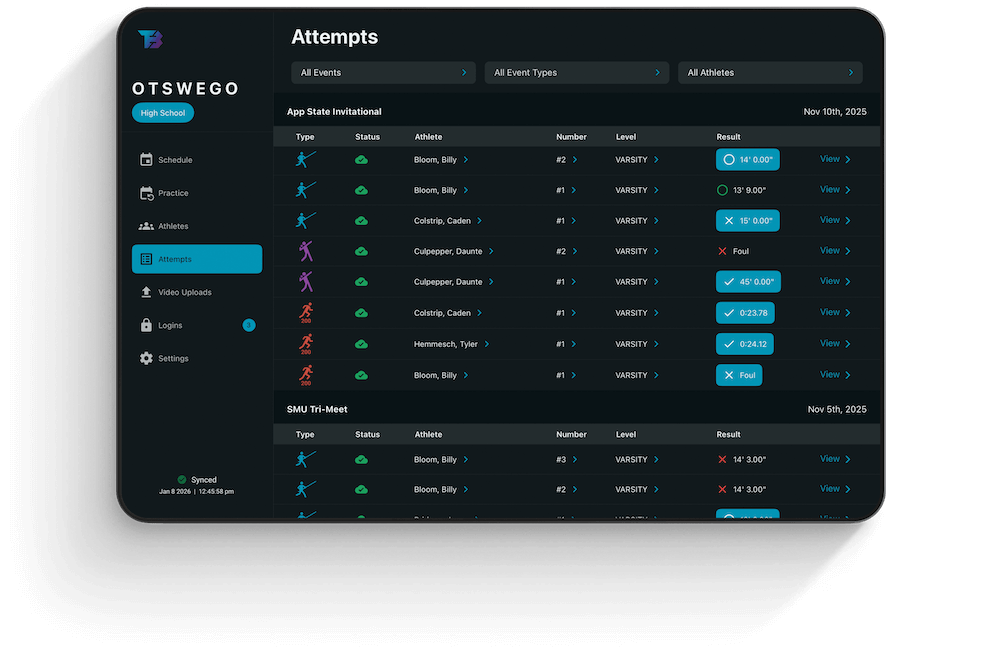
Filters for Practices and Competitions

Filter views by:

  • Practice vs competition
  • Season
  • Athlete

Why it matters:

  • Find what you need immediately
  • Cleaner athlete detail screens
  • Less clutter during review

Automatic Season Selection

The app now defaults to the current season upon login.

Why it matters:

  • No manual season switching
  • Fewer missed entries
  • Less setup friction

Attempt Counts Per Meet

A visible attempt count is now shown per meet.

Why it matters:

  • Quick context at a glance
  • Easier meet-level review

Upload & Sync Improvements

TrackBoss 2.0 improves clarity and control around uploads and syncing.

Upload All Queue

You can now queue all uploads at once.

Why it matters:

  • Fewer taps
  • Faster post-meet workflows
  • Less chance of missing an upload

Improved Manual Sync Button

The sync button has been relocated and made more visible.

Why it matters:

  • Easier manual control when needed
  • Clearer system feedback

Clear Upload Status Indicators

Updated icons make upload status easier to understand.

Why it matters:

  • Immediate clarity on what’s complete
  • Less guessing and re-checking

Mobile User Interface Updates

TrackBoss 2.0 includes a refreshed mobile experience focused on clarity and speed.

Mobile-Optimized Card Design

A new card layout is used throughout the app.

Why it matters:

  • Cleaner screens
  • Faster scanning
  • Better one-handed use

Improved Jog Wheel Design

The jog wheel now has a 3D appearance with tactile feedback.

Why it matters:

  • More precise adjustments
  • Better feel during live entry

Account Type Visibility

A new column has been added in the logins area.

Why it matters:

  • Clearer role management
  • Fewer account setup issues

Athlete & Coach Management

Managing athletes and logins is simpler in TrackBoss 2.0.

Profile Invite Links

Invite athletes using a direct link.

Why it matters:

  • Faster onboarding
  • Fewer setup questions
  • Less admin work

Editable and Reassignable Logins

Coaches can now edit and reassign athlete logins.

Why it matters:

  • Easier roster changes
  • No need to recreate accounts

Default Athlete Visibility

New accounts default to allowing athletes to view all content.

Why it matters:

  • Immediate access for athletes
  • Fewer permission issues

Filter Rejected Attempts

Rejected attempts can now be filtered out during review.

Why it matters:

  • Cleaner analysis
  • More focused feedback

Getting TrackBoss 2.0

TrackBoss 2.0 is live now.

  • Update the app to access all features
  • No additional setup required
  • All improvements are included automatically

If you have questions or want help applying these updates to your workflow, our team is always here to help.

Questions about TrackBoss?

If you want help applying TrackBoss to your specific events, roster, or season, our team is happy to walk through it with you.

Talk to our team